
 HTML CSS
What is HTML?
HTML stands for Hypertext Markup Language. It allows the user to create and structure sections, paragraphs, headings, links, and blockquotes for web pages and applications.
HTML is the standard markup language for Web pages
HTML elements are the building blocks of HTML pages
HTML elements are represented by <> tags
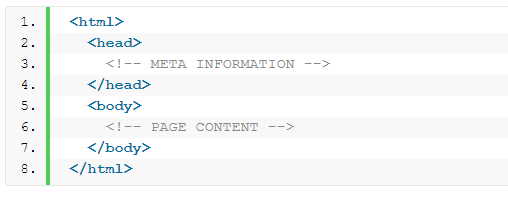
The three block level tags every HTML document needs to contain are:
The html tag is the highest level element that encloses every HTML page.
The head tag holds meta information such as the page’s title and charset.
Finally, the body tag encloses all the content that appears on the page.
What is CSS?
CSS stands for Cascading Style Sheets with an emphasis placed on “Style.” While HTML is used to structure a web document (defining things like headlines and paragraphs, and allowing you to embed images, video, and other media), CSS comes through and specifies your document’s style—page layouts, colors, and fonts are all determined with CSS.
External stylesheets are stored in CSS files

Example:

Whats is Visual Studio Code (VSCode)?

Visual Studio Code is a source-code editor developed by Microsoft for Windows, Linux and macOS. It includes support for debugging, embedded Git control and GitHub, syntax highlighting, intelligent code completion, snippets, and code refactoring. It is highly customizable, allowing users to change the theme, keyboard shortcuts, preferences, and install extensions that add additional functionality. The source code is free and open source and released under the permissive MIT License. The compiled binaries are freeware and free for private or commercial use.
Visual Studio Code is based on Electron, a framework which is used to deploy Node.js applications for the desktop running on the Blink layout engine.
More topics covered:
- Loading html pages from local hard drive
- Embed CSS styles into HTML page: inline, style tag, file
- What is Markup language?
- VSCode loading from CMD using “code”
- VSCode – “!” shortcut
- HTML semantics
- CSS selectors
- HTML Tags: b, u, i, p, div, a, hr, h1..h6, img, ul, ol, li, br, btn
- What is Bootstrap?
- Developer tools – clicking F12 in Chrome
- w3schools
Links:
 .NET Experts