
 iis okhttp-post-put-delete gson
OkHttp
You can fire GET POST PUT DELETE using OkHttp
for example, POST:

- The emulator connects to localhost using ip: http://10.0.2.2
- The emulator cannot connect to IIS express, so you need to install IIS (see below)
GSON
Gson is a Java library that can be used to convert Java Objects into their JSON representation. It can also be used to convert a JSON string to an equivalent Java object. Gson can work with arbitrary Java objects including pre-existing objects that you do not have source-code of.
Goals
- Provide simple toJson( ) and fromJson( ) methods to convert Java objects to JSON and vice-versa
- Allow pre-existing unmodifiable objects to be converted to and from JSON
- Extensive support of Java Generics
- Allow custom representations for objects
- Support arbitrarily complex objects (with deep inheritance hierarchies and extensive use of generic type
Internet Information Services (IIS)

IIS (Internet Information Services) is a web server software designed for Windows Server. It is used for hosting websites and lots of other content on the web. IIS is a most popular option for all the commercial sites since it offers many advanced features and is supported by Microsoft. Microsoft’s IIS provides graphical user-interface for maintaining websites and the associated users. It offers a visual means of developing configuring and publishing sites on the web. The Internet Information Services administrator tool enables web manager to easily modify website options such as default page, logging setting, security setting, and performance optimizations.
The Internet Information Services (IIS) can serve both standard HTML web pages and dynamic web pages including ASP.NET application and PHP pages. When a visitor accesses a webpage on the static website, the IIS simply sends the HTML and associated images to the user’s browser. When a webpage on the dynamic website is accessed, Internet Information Services runs any applications and processes any scripts contained in the page, then sends all the resulting data the visitor browser.
Although IIS includes all the major features to host a website, it also supports extension in order to add extra functionalities to the server. Such as the WinCache Extension allow PHP scripts to run faster by caching processes. The URL Rewrite extension enables webmasters to publish web pages with the friendly URL that are quite simple for visitors to type and remember. The streaming extension can be used to provide streaming media to the website visitors.
Set up IIS
What you need to do is enable the feature. In Windows 10, you can press the Windows key and type “turn win.” You should see “Turn Windows features on or off.”
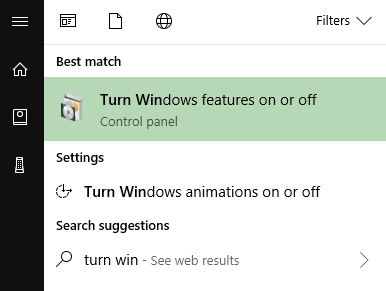
The Internet Information Services (IIS) option is the one we want!
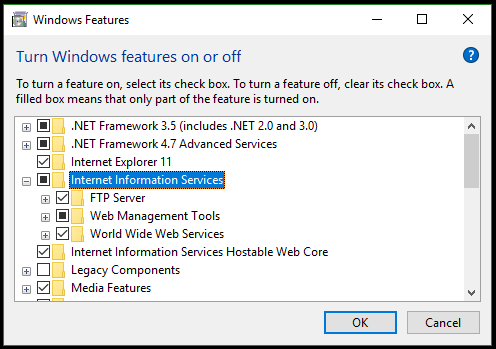
Once you have all the desired IIS features selected, click OK and go get a fresh cup of coffee
Whats is w3wp.exe ?
An Internet Information Services (IIS) worker process is a windows process (w3wp.exe) which runs Web applications, and is responsible for handling requests sent to a Web Server for a specific application pool. It is the worker process for IIS. Each application pool creates at least one instance of w3wp.exe and that is what actually processes requests in your application. It is not dangerous to attach to this, that is just a standard windows message
Whats is application pool ?
Every website or a part of the website,you can run under an application pool.You can control some basic settings of the website using an application pool.
- You would like the website to run under a different w3wp.exe process.Then create a new application pool and assign that to the website.
- You would like to run the website and all it’s code under a different user account(e.g under Admin privileges),you can run do that by changing Application Pool Identity.
- You would like to run a particular application under .net framework 4.0 or 2.0.
- You would like to make sure the website in 32 bit mode or have a scheduled recycle of the w3wp.exe process etc.All such things are controlled from iis application pool.
Whats is IIS express ?
IIS Express is a lightweight, self-contained version of IIS optimized for developers. IIS Express makes it easy to use the most current version of IIS to develop and test websites. It has all the core capabilities of IIS 7 and above as well as additional features designed to ease website development including:
- It doesn’t run as a service or require administrator user rights to perform most tasks.
- IIS Express works well with ASP.NET and PHP applications.
- Multiple users of IIS Express can work independently on the same computer.
more topics covered:
- Deploy ASP.NET application into IIS
- IIS_IUSRS built-in group
- Debugging IIS application
- Attach to w3wp.exe process
- using GSON for class instance
- using GSON for specific key
- using GSON in toString( )
Links:
 .NET Experts