13 APR 2020

drawing-apps bitmap-to-file

andy4

draw4

Canvas onDraw

When you create you own custom view you will probably give the view its own special appearance. You probably want to draw the elements of the view onto the screen somehow. This is achieved by overriding the onDraw method of the View class. The signature of this method is

protected void onDraw (Canvas canvas);

When you implement the method you are given a Canvas object on which you can draw you view. This method will be called when the system decides that your view should be rendered onto the screen.

Example:

public class MyView extends View {
   Paint paint = new Paint();
   protected void onDraw (Canvas canvas) {
      int w = getWidth();
      int h = getHeight();
      int radius = Math.min(w,h)/2 - 10;
      paint.setARGB(255, 255, 0, 0);
      canvas.drawCircle(w/2, h/2, radius, paint);
   }
}

The combination of a Paint object with the Canvas is a powerful tool for creating complex drawings.

When is onDraw called

The onDraw method is called whenever android thinks that your view should be redrawn. This can be tha case when your view is animated, in which case onDraw is called for every frame in the animation. It is also called when the layout changes and your view is re-positioned on the screen.

But what if some data inside your view has changed and you want to make sure that the view is redrawn. You can’t call onDraw directly. Instead you should call invalidate to tell the view that it needs to redraw itself.

Performance

The onDraw method is called from the UI thread. This means that you should make sure that the code inside the method performs as fast as possible. Anything that takes too much time should either be done during initialization or in a separate thread. Allocating objects with new is can be quite a performance drag, especially if done repeatedly. For this reason you should avoid allocating new objects within the onDraw method.

If your drawing becomes elaborate and requires some time consuming computation you should consider placing the code in a separate thread. This will take load off the UI thread and make your view more responsive. One class that is very useful in this context is the Picture class.

… full article

Drawing using xml

We are going to draw a circle on a View. The circle is defined in an XML file. The manifest file does not need to be modified.

oval.xml
<?xml version="1.0" encoding="utf-8"?>
<shape xmlns:android="http://schemas.android.com/apk/res/android"
    android:shape="oval">
    
   <solid 
       android:color="#666666"/>
   <size 
       android:width="70dp"
       android:height="70dp"/>
</shape> 

In the oval.xml file we create a circle shape. We define its colour and size. The oval.xml file is located in the res/drawable directory.

… full article

DialogFragment?

draw5

In a very simple sentence, a Dialog Fragment is a fragment that is used to make Dialogs that floats on some Activity.

DialogFragment is a utility class which extends the Fragment class. So, a DialogFragment displays or shows a Dialog but inside a Fragment i.e. all the information regarding the Dialog or the data associated with the Dialog will be stored or managed in the Fragment only. You can use the DialogFragment in API level 11 or higher.

Since DialogFragment is associated with Fragment, so it has it’s own Life Cycle and now the Activity need not manage the lifecycle of Dialogs. Due to this reason, DialogFragments are recommended to be used while implementing Alert Dialog or any other type of Dialogs in Android.

… full article

more topics covered:

  • getting album directory
  • read-write bmp files
  • PrintHelper.systemSupportsPrint
  • PrintHelper.printBitmap
  • calling FragmantDialog
  • Bitmap.Config.ARGB_8888

Links:

10 APR 2020

surface view canvas audio-manager

andy4

cannon

Surface view

Provides a dedicated drawing surface embedded inside of a view hierarchy. You can control the format of this surface and, if you like, its size; the SurfaceView takes care of placing the surface at the correct location on the screen

One of the purposes of this class is to provide a surface in which a secondary thread can render into the screen. If you are going to use it this way, you need to be aware of some threading semantics:

  • All SurfaceView and SurfaceHolder.Callback methods will be called from the thread running the SurfaceView’s window (typically the main thread of the application). They thus need to correctly synchronize with any state that is also touched by the drawing thread.
  • You must ensure that the drawing thread only touches the underlying Surface while it is valid — between #surfaceCreated and #surfaceDestroyed of SurfaceHolder.Callback
SurfaceHolder.Callback
A client may implement this interface to receive information about changes to the surface. When used with a SurfaceView, the Surface being held is only available between calls to surfaceCreated(android.view.SurfaceHolder) and surfaceDestroyed(android.view.SurfaceHolder). The Callback is set with addCallback method

… full article

we can use the canvas (see below)  in order to draw on the SurfaceView

Canvas

To draw onto a canvas in Android, you will need four things:

  1. A bitmap or a view — to hold the pixels where the canvas will be drawn.
  2. Canvas — to run the drawing commands on.
  3. Drawing commands — to indicate to the canvas what to draw.
  4. Paint — to describe how to draw the commands.

Canvas Coordinate System

canvas2

The coordinate system of the Android canvas starts in the top left corner, where [0,0] represents that point. The y axis is positive downwards, and x axis positive towards the right. All elements drawn on a canvas are placed relative to the [0,0] point. When working with the Canvas, you are working with px and not dp, so any methods such as translating, or resizing will be done in pixel sizes.

Get access to a Canvas instance

In order to get access to a Canvas instance, you will need to create a class that extends from View. This will then allow you to override the onDraw method, which has a Canvas as a parameter.

In Surfaceview you can use surfaceHolder.lockCanvas to get the Canvas instance. in order to get the surface view holder use surfaceView.getHolder method (use this from the class inherite from SurfaceView).

Examples

canvas.drawBitmap ( bitmap, null, rect, paint )
canvas.drawCircle ( x, y, size, paint )
canvas.drawRect ( rect, paint )

Paint class

The Paint class typically holds colour and style information. The Paint object is then used for drawing objects (i.e. bitmap, text, paths etc) onto a Canvas.

for example:
paint1.setColor (Color.WHITE);
canvas.drawRect( 0, 0, canvas.getWidth(), canvas.getHeight ( ),
  paint1 );

… full article

AudioManager

You can easily control your ringer volume and ringer profile for example:  silent,vibrate,loud etc. in android. Android provides AudioManager class that provides access to these controls. In order to use AndroidManager class, you have to first create an object of AudioManager class by calling the getSystemService(Context.AUDIO_SERVICE). Apart from the getRingerMode method, there are other methods available in the AudioManager class to control the volume and other modes

… full article

more topics covered:

  • Fragment lifecycle
  • when to use Fragment
  • raw resource folder
  • Thread implementation for game
  • synchronized ( surfaceHolder )

Links:

08 APR 2020

content provider broadcast receiver handler

andy4

apps

Content provider

By using content provider, users can choose to share only some part of the data in one application, thus can avoid privacy data leak in the program. At present, the use of content provider is the standard way for Android to share data across applications.

Content resolver
Each android application can be a content provider. For example, android phone contacts, short message system and android media library.
To get data from a content provider, you need to use a ContentResolver instance in your app. Generally the ContentResolver instance can be obtained by Activity‘s getContentResolver method.
Content URI
Content URI is a unique resource identifier that content provider app provides for client app to access it’s shared data.

Query Content Provider Data

query(Uri uri, String columnArray[], String whereClause, String wherePlaceHolderValue[], String orderByClause)
The query method return a android.database.Cursor object, if it is not null, then use it’s moveToFirst method to move to the first row.Then loop in the cursor to get each row use it’s moveToNext  method.
… full article

Broadcast receiver

A broadcast receiver (receiver) is an Android component which allows you to register for system or application events. All registered receivers for an event are notified by the Android runtime once this event happens.

For example, applications can register for the ACTION_BOOT_COMPLETED system event which is fired once the Android system has completed the boot process.

… full article

Application lifecycle

life2

… full article

more topics covered:

  • content resolver
  • content uri
  • android intent result
  • contact picker
  • message from service to activity
  • application lifecycle

Links:

07 APR 2020

services

andy4

Android Services

Service is an application component that can perform long-running operations in the background, and it doesn’t provide a user interface. Another application component can start a service, and it continues to run in the background even if the user switches to another application. Additionally, a component can bind to a service to interact with it and even perform interprocess communication (IPC). For example, a service can handle network transactions, play music, perform file I/O, or interact with a content provider, all from the background.

These are the three different types of services:

Foreground
A foreground service performs some operation that is noticeable to the user. For example, an audio app would use a foreground service to play an audio track. Foreground services must display a Notification. Foreground services continue running even when the user isn’t interacting with the app.
Background
A background service performs an operation that isn’t directly noticed by the user. For example, if an app used a service to compact its storage, that would usually be a background service.

Note: If your app targets API level 26 or higher, the system imposes restrictions on running background services when the app itself isn’t in the foreground.

Bound
A service is bound when an application component binds to it by calling bindService( ). A bound service offers a client-server interface that allows components to interact with the service, send requests, receive results, and even do so across processes with interprocess communication (IPC). A bound service runs only as long as another application component is bound to it. Multiple components can bind to the service at once, but when all of them unbind, the service is destroyed.

… full article

more topics covered:

  • start/stop service
  • notifications
  • binder
  • serviceConnection
  • service api
  • run method on service

Links:

05 APR 2020

sqlite activity-result

andy4

sqlite370_banner

SQLite is a C-language library that implements a small, fast, self-contained, high-reliability, full-featured, SQL database engine. SQLite is the most used database engine in the world. SQLite is built into all mobile phones and most computers and comes bundled inside countless other applications that people use every day

Android SQLite is the mostly preferred way to store data for android applications. For many applications, SQLite is the apps backbone whether it’s used directly or via some third-party wrapper

SQLiteOpenHelper

A helper class to manage database creation and version management. You create a subclass implementing onCreate(SQLiteDatabase), onUpgrade(SQLiteDatabase, int, int) and optionally onOpen(SQLiteDatabase), and this class takes care of opening the database if it exists, creating it if it does not, and upgrading it as necessary. Transactions are used to make sure the database is always in a sensible state.

… full article

Activity result

Starting another activity, whether one within your app or from another app, doesn’t need to be a one-way operation. You can also start another activity and receive a result back. For example, your app can start a camera app and receive the captured photo as a result. Or, you might start the Contacts app in order for the user to select a contact and you’ll receive the contact details as a result.

… full article

more topics covered:

  • sqLiteDatabase- execSQL
  • sqLiteDatabase- rawQuery
  • sqLiteDatabase- helper methods (i.e. insert)
  • startActivityForResult
  • onActivityResult

Links:

31 MAR 2020

heroku-cloud firebase spring

andy4

sp3

Spring Framework is a Java platform that provides comprehensive infrastructure support for developing Java applications. Spring handles the infrastructure so you can focus on your application.

spring

In Spring MVC, a controller can handle the requests for all HTTP methods, which is a backbone of RESTful web services.

spring download link

mysql1

MySQL is a freely available open source Relational Database Management System (RDBMS) that uses Structured Query Language (SQL).

MySQL home page

MySQL free cloud hosting link

MySQL workbench download link

heroku

Heroku is a cloud platform that lets companies build, deliver, monitor and scale apps — we’re the fastest way to go from idea to URL, bypassing all those infrastructure headaches.

  • Heroku provides free cloud hosting

Heroku home page

firebase

Firebase is a Backend-as-a-Service (Baas). It provides developers with a variety of tools and services to help them develop quality apps, grow their user base, and earn profit. It is built on Google’s infrastructure.

Firebase is categorized as a NoSQL database program, which stores data in JSON-like documents.

Realtime database – Store and sync data with our NoSQL cloud database. Data is synced across all clients in realtime, and remains available when your app goes offline. The Firebase Realtime Database is a cloud-hosted database. Data is stored as JSON and synchronized in realtime to every connected client. When you build cross-platform apps with our iOS, Android, and JavaScript SDKs, all of your clients share one Realtime Database instance and automatically receive updates with the newest data.

Firebase home page

Git command line tools

git1

fetch code from GitHub into our computer:
git clone [GitHub-url]

upload code from our computer to GitHub:
git init
git remote add origin  [GitHub-url]
git add .
git commit -m “test”
git push origin master

more topics covered:

  • tomcat – java web server
  • spring rest and mysql
  • spring rest and firebase

Links:

25 MAR 2020

shared-preferences basic-activity floating-action-button

andy4

Shared Preferences

shared

If you have a relatively small collection of key-values that you’d like to save, you should use the SharedPreferences APIs. A SharedPreferences object points to a file containing key-value pairs and provides simple methods to read and write them. Each SharedPreferences file is managed by the framework and can be private or shared.

… full article

Fragments

frag

A Fragment represents a behavior or a portion of user interface in a FragmentActivity. You can combine multiple fragments in a single activity to build a multi-pane UI and reuse a fragment in multiple activities. You can think of a fragment as a modular section of an activity, which has its own lifecycle, receives its own input events, and which you can add or remove while the activity is running (sort of like a “sub activity” that you can reuse in different activities).

… full article

Basic Activity

basic

This template creates a simple app with an app bar and a floating action button. It acts as a starting point for your project by providing commonly used UI components.

This template includes:

  • AppBar
  • FloatingActionButton
  • Two layout files: one for the activity and one to separate out text content

… full article

Snackbar

The Snackbar widget provides brief feedback about an operation through a message at the bottom of the screen. Snackbars disappear automatically, either after a timeout or after a user interaction elsewhere on the screen, and can also be swiped off the screen.

Snackbars can also offer the ability to perform an action, such as undoing an action that was just taken, or retrying an action that had failed.

… full article

more topics covered:

  • snackbar – undo action
  • read\write data from preferences

Links:

22 MAR 2020

iis okhttp-post-put-delete gson

andy4

OkHttp

You can fire GET POST PUT DELETE using OkHttp

for example, POST:

post

  • The emulator connects to localhost using ip: http://10.0.2.2
  • The emulator cannot connect to IIS express, so you need to install IIS (see below)

GSON

Gson is a Java library that can be used to convert Java Objects into their JSON representation. It can also be used to convert a JSON string to an equivalent Java object. Gson can work with arbitrary Java objects including pre-existing objects that you do not have source-code of.

Goals

  • Provide simple toJson( ) and fromJson( ) methods to convert Java objects to JSON and vice-versa
  • Allow pre-existing unmodifiable objects to be converted to and from JSON
  • Extensive support of Java Generics
  • Allow custom representations for objects
  • Support arbitrarily complex objects (with deep inheritance hierarchies and extensive use of generic type

Internet Information Services (IIS)

IIS

IIS (Internet Information Services) is a web server software designed for Windows Server. It is used for hosting websites and lots of other content on the web. IIS is a most popular option for all the commercial sites since it offers many advanced features and is supported by Microsoft. Microsoft’s IIS provides graphical user-interface for maintaining websites and the associated users. It offers a visual means of developing configuring and publishing sites on the web. The Internet Information Services administrator tool enables web manager to easily modify website options such as default page, logging setting, security setting, and performance optimizations.

The Internet Information Services (IIS) can serve both standard HTML web pages and dynamic web pages including ASP.NET application and PHP pages. When a visitor accesses a webpage on the static website, the IIS simply sends the HTML and associated images to the user’s browser. When a webpage on the dynamic website is accessed, Internet Information Services runs any applications and processes any scripts contained in the page, then sends all the resulting data the visitor browser.

Although IIS includes all the major features to host a website, it also supports extension in order to add extra functionalities to the server. Such as the WinCache Extension allow PHP scripts to run faster by caching processes. The URL Rewrite extension enables webmasters to publish web pages with the friendly URL that are quite simple for visitors to type and remember. The streaming extension can be used to provide streaming media to the website visitors.

Set up IIS

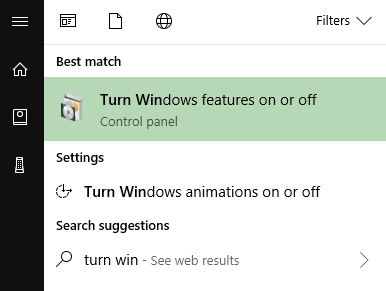
What you need to do is enable the feature. In Windows 10, you can press the Windows key and type “turn win.” You should see “Turn Windows features on or off.”

https://www.hitsubscribe.com/wp-content/uploads/2018/04/TurnWindowsFeaturesOnOrOff.png

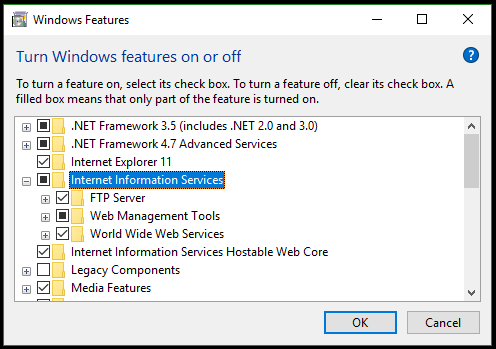
The Internet Information Services (IIS) option is the one we want!

https://www.hitsubscribe.com/wp-content/uploads/2018/04/WindowsFeatures-1.png

Once you have all the desired IIS features selected, click OK and go get a fresh cup of coffee

… full article

Whats is w3wp.exe ?

An Internet Information Services (IIS) worker process is a windows process (w3wp.exe) which runs Web applications, and is responsible for handling requests sent to a Web Server for a specific application pool. It is the worker process for IIS. Each application pool creates at least one instance of w3wp.exe and that is what actually processes requests in your application. It is not dangerous to attach to this, that is just a standard windows message

Whats is application pool ?

Every website or a part of the website,you can run under an application pool.You can control some basic settings of the website using an application pool.

  1. You would like the website to run under a different w3wp.exe process.Then create a new application pool and assign that to the website.
  2. You would like to run the website and all it’s code under a different user account(e.g under Admin privileges),you can run do that by changing Application Pool Identity.
  3. You would like to run a particular application under .net framework 4.0 or 2.0.
  4. You would like to make sure the website in 32 bit mode or have a scheduled recycle of the w3wp.exe process etc.All such things are controlled from iis application pool.

Whats is IIS express ?

IIS Express is a lightweight, self-contained version of IIS optimized for developers. IIS Express makes it easy to use the most current version of IIS to develop and test websites. It has all the core capabilities of IIS 7 and above as well as additional features designed to ease website development including:

  • It doesn’t run as a service or require administrator user rights to perform most tasks.
  • IIS Express works well with ASP.NET and PHP applications.
  • Multiple users of IIS Express can work independently on the same computer.

… full article

more topics covered:

  • Deploy ASP.NET application into IIS
    • IIS_IUSRS built-in group
  • Debugging IIS application
    • Attach to w3wp.exe process
  • using GSON for class instance
  • using GSON for specific key
  • using GSON in toString( )

Links:

18 MAR 2020

custom-array-adapter okhttp alert-dialog

andy4

Custom Array Adapter

types-of-android-adapters

In Android development, any time we want to show a vertical list of scrollable items we will use a ListView which has data populated using an Adapter. The simplest adapter to use is called an ArrayAdapter because the adapter converts an ArrayList of objects into View items loaded into the ListView container.

The ArrayAdapter fits in between an ArrayList (data source) and the ListView (visual representation) and configures two aspects:

  • Which array to use as the data source for the list
  • How to convert any given item in the array into a corresponding View object

Note as shown above that there are other data sources besides an ArrayAdapter such as the CursorAdapter which instead binds directly to a result set from a Local SQLite Database.

… full article

Custom ArrayAdapter – nice tutorial

Drawable Resource

step2

A drawable resource is a general concept for a graphic that can be drawn to the screen and which you can retrieve with APIs such as getDrawable(int) or apply to another XML resource with attributes such as android:drawable and android:icon. There are several different types of drawables:

Bitmap File
A bitmap graphic file (.png, .jpg, or .gif). Creates a BitmapDrawable.
Nine-Patch File
A PNG file with stretchable regions to allow image resizing based on content (.9.png). Creates a NinePatchDrawable.

… full article

Alert Dialog

aldi

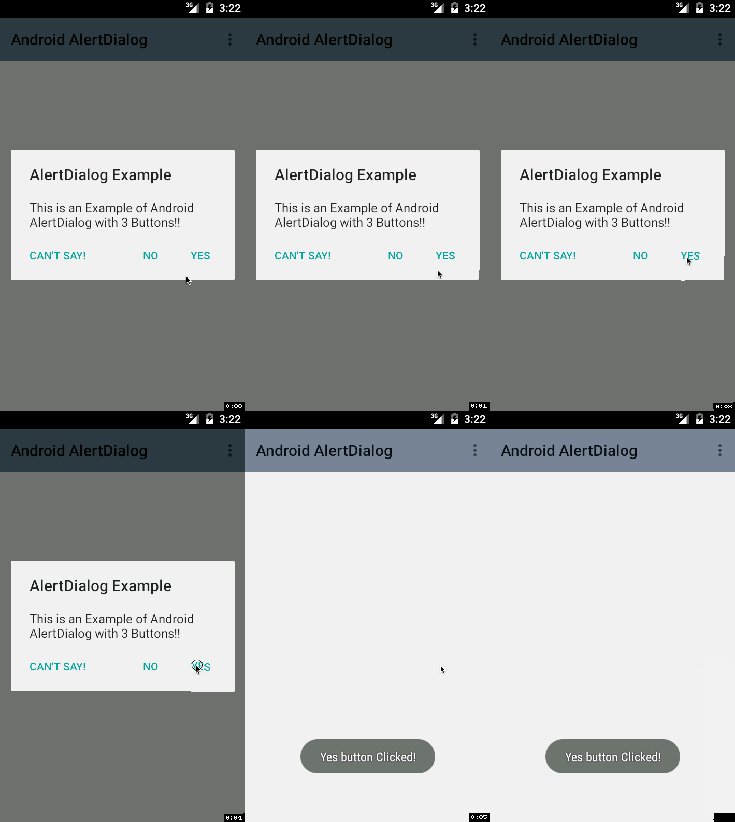
A subclass of Dialog that can display one, two or three buttons. If you only want to display a String in this dialog box, use the setMessage() method. If you want to display a more complex view, look up the FrameLayout called “custom” and add your view to it

… full article

OkHttp

OkHttp is an HTTP client that’s efficient by default:

  • HTTP/2 support allows all requests to the same host to share a socket.
  • Connection pooling reduces request latency (if HTTP/2 isn’t available).
  • Transparent GZIP shrinks download sizes.
  • Response caching avoids the network completely for repeat requests.

OkHttp perseveres when the network is troublesome: it will silently recover from common connection problems. If your service has multiple IP addresses OkHttp will attempt alternate addresses if the first connect fails. This is necessary for IPv4+IPv6 and services hosted in redundant data centers. OkHttp supports modern TLS features (TLS 1.3, ALPN, certificate pinning). It can be configured to fall back for broad connectivity.

Using OkHttp is easy. Its request/response API is designed with fluent builders and immutability. It supports both synchronous blocking calls and async calls with callbacks.

OkHttp – home page

runOnUiThread

Runs the specified action on the UI thread. If the current thread is the UI thread, then the action is executed immediately. If the current thread is not the UI thread, the action is posted to the event queue of the UI thread.

… full article

Links:

15 MAR 2020

list-view intent webview

andy4

Webview

WebView objects allow you to display web content as part of your activity layout, but lack some of the features of fully-developed browsers. A WebView is useful when you need increased control over the UI and advanced configuration options that will allow you to embed web pages in a specially-designed environment for your app.

Progressive web application

pwa1

A progressive web application (PWA) is a type of application software delivered through the web, built using common web technologies including HTML, CSS and JavaScript. It is intended to work on any platform that uses a standards-compliant browser. Functionality includes working offline, push notifications, and device hardware access, enabling creating user experiences similar to native applications on desktop and mobile devices. Since a progressive web app is a type of webpage or website known as a web application, there is no requirement for developers or users to install the web apps via digital distribution systems like Apple App Store or Google Play.

Request App Permissions

Every Android app runs in a limited-access sandbox. If an app needs to use resources or information outside of its own sandbox, the app has to request the appropriate permission. You declare that your app needs a permission by listing the permission in the app manifest and then requesting that the user approve each permission at runtime (on Android 6.0 and higher).

On all versions of Android, to declare that your app needs a permission, put a <uses-permission> element in your app manifest, as a child of the top-level <manifest> element

… full article

Intent

An intent is an abstract description of an operation to be performed. An Intent provides a facility for performing late runtime binding between the code in different applications. Its most significant use is in the launching of activities, where it can be thought of as the glue between activities. It is basically a passive data structure holding an abstract description of an action to be performed.

ListView

lv3

Displays a vertically-scrollable collection of views, where each view is positioned immediately below the previous view in the list. For a more modern, flexible, and performant approach to displaying lists, use RecyclerView.

A list view is an adapter view that does not know the details, such as type and contents, of the views it contains. Instead list view requests views on demand from a ListAdapter as needed, such as to display new views as the user scrolls up or down. In order to display items in the list, call setAdapter(android.widget.ListAdapter) to associate an adapter with the list

ArrayAdapter

You can use this adapter to provide views for an AdapterView, Returns a view for each object in a collection of data objects you provide, and can be used with list-based user interface widgets such as ListView or Spinner.

By default, the array adapter creates a view by calling Object#toString() on each data object in the collection you provide, and places the result in a TextView. You may also customize what type of view is used for the data object in the collection. To customize what type of view is used for the data object, override getView(int, android.view.View, android.view.ViewGroup) and inflate a view resource.

Links:

Design a site like this with WordPress.com
Get started