20 NOV 2019

angularjs more-js

angularjs.PNG

AngularJS is a JavaScript-based open-source front-end web framework mainly maintained by Google and by a community of individuals and corporations to address many of the challenges encountered in developing single-page applications (SPA). It aims to simplify both the development and the testing of such applications by providing a framework for client-side model–view–controller (MVC) and model–view–viewmodel (MVVM) architectures, along with components commonly used in rich Internet applications.

AngularJS is the frontend part of the MEAN stack, consisting of MongoDB database, Express.js web application server framework, Angular.js itself, and Node.js server runtime environment.

directives: ng-app, ng-init, ng-if, ng-show, ng-bind, {{ }}

JavaScript – more ES6 features

ES6 features summary page

Final project : Client-side

flightweb.PNG

Click here do download!

More topics covered:

  • downloading angular
  • page rendering
  • angularjs loop
  • console error – dev tools

Links:

recommended book

es6.png

17 NOV 2019

CORS jquery-ajax

cors3.png

What is Cross-Origin Resource Sharing?

Cross-Origin Resource Sharing (CORS) enables client-side code running in a browser in a particular domain to access resources hosted in another domain in a secure manner. Cross-origin requests are typically not permitted by browsers, and CORS provides a framework in which cross-domain requests are treated as same-domain requests.
For example, using CORS, JavaScript embedded in a web page can make an HTTP XMLHttpRequest to a different domain. This is used to send an HTTP or HTTPS request to a web server, and to load the server response data back into the script.
… full article

CORS may be solved by:

  • Placing the HTML page on the server
  • Enabling CORS –  code or config
  • JSONP
  • Chrome Extension

Enable CORS in WebApi – click here!

More JS

More topics covered:

  • Showing XHR tab in dev console
  • display AJAX result into a table
  • $.each
  • variable starts with $
  • Why CORS important for development
  • CORS differ by ports
  • Postman overcomes CORS
  • Enable CORS for specific domain
  • Enable CORS for specific header
  • Enable CORS for specific method
  • Enable CORS for entire class

Links:

13 NOV 2019

javascript bootstrap

web12.png

boot.jpg

Bootstrap is a free and open-source CSS framework directed at responsive, mobile-first front-end web development. It contains CSS- and (optionally) JavaScript-based design templates for typography, forms, buttons, navigation and other interface components. was developed by Twitter

Bootstrap Home page – click here!

More JS

  • call, apply
  • function-copy
  • scope
  • Hoisting – MDN doc
  • Closure – MDN doc
  • IIFE (Immediately Invoked Function Expression) – MDN doc

AJAX.png

AJAX allows web pages to be updated asynchronously by exchanging data with a web server behind the scenes. This means that it is possible to update parts of a web page, without reloading the whole page

ajax2.png

full article

AJAX xmlhttprequest – MDN

More topics covered:

  • js “compilation”
  • variables and func in window scope
  • js – random, Math.floor
  • js using Garbage Collector (GC)
  • function foo vs foo = var function
  • adding js script link to HTML
  • Bootstrap grid system

Links:

10 NOV 2019

jquery javascript

jsjq.png

What is JQuery?

jQuery is a fast, small, and feature-rich JavaScript library. It makes things like HTML document traversal and manipulation, event handling, animation, and Ajax much simpler with an easy-to-use API that works across a multitude of browsers. With a combination of versatility and extensibility, jQuery has changed the way that millions of people write JavaScript … full article

jQuery was originally created in January 2006

What is JQuery UI?

jQuery UI is a collection of GUI widgets, animated visual effects, and themes implemented with jQuery (a JavaScript library), Cascading Style Sheets, and HTML. According to JavaScript analytics service, Libscore, jQuery UI is used on over 197,000 of the top one million websites, making it the second most popular JavaScript library. Notable users include Pinterest, PayPal, IMDb, The Huffington Post, and Netflix.

More JavaScript

Arrays, forEach, creating objects as JSON, creating objects in methods, creating objects in ctor methods, adding function to an object, arguments in functions, ES6 shortcuts

More topics covered:

  • Content Delivery Network (CDN)
  • Minify javascript
  • import jquery into HTML page
  • JQuery – dollar sign $
  • JQuery on page load function
  • JQuery selectors
  • JQuery animations
  • JQuery adding events

Links:

06 NOV 2019

javascript ECMA scratchjs

javascript.jpg

What is JavaScript?

JavaScript (JS) is a lightweight, interpreted, or just-in-time compiled programming language with first-class functions. While it is most well-known as the scripting language for Web pages, many non-browser environments also use it, such as Node.js, Apache CouchDB and Adobe Acrobat. JavaScript is a prototype-based, multi-paradigm, single-threaded, dynamic language, supporting object-oriented, imperative, and declarative
programming) styles. … full article

JavaScript was first known as LiveScript, but Netscape changed its name to JavaScript, possibly because of the excitement being generated by Java. JavaScript made its first appearance in Netscape 2.0 in 1995 with the name LiveScript. The general-purpose core of the language has been embedded in Netscape, Internet Explorer, and other web browsers.
The standard of scripting languages like JavaScript is ECMAScript

What is ECMAScript?

The full form of ECMA is European Computer Manufacturer’s Association. ECMAScript is a Standard for scripting languages such as JavaScript, JScript, etc. It is a trademark scripting language specification. JavaScript is a language based on ECMAScript. A standard for scripting languages like JavaScript, JScript is ECMAScript. JavaScript is considered as one of the most popular implementations of ECMAScript.

ECMAScript 5
ECMAScript 5 was released in 2009.
These were the new features released in 2009:
The “use strict” directive, String.trim, Array.isArray, Array.forEach, Array.map, Array.filter, Array.reduce, Array.reduceRight, Array.every, Array.some, Array.indexOf, Array.lastIndexOf, JSON.parse, JSON.stringify, Date.now, Property Getters and Setters, New Object Property Methods

ECMAScript 5 Syntactical Changes:
Property access [ ] on strings, Trailing commas in array and object literals, Multiline string literals, Reserved words as property names

es5.jpg

ECMAScript 6
ECMAScript 6 is also known as ES6 and ECMAScript 2015.
Some people call it JavaScript 6.

Some of the new features in ES6:
JavaScript let
JavaScript const
JavaScript Arrow Functions
JavaScript Classes
Default parameter values
Array.find()
Array.findIndex()
Exponentiation (**) (EcmaScript 2016)

es6.jpg

What is ScratchJS?

scratchjs

ScratchJS is a Chrome add-on for DevTools which integrates both the Traceur and Babel transpilers, allowing you to test out the new JS features coming with ECMAScript 6, also known as ES6 or ES2015. It also supports CoffeeScript, LiveScript and more compile-to-JS languages will be added soon

More topics covered:

  • javascript types
  • javascript basic commands
  • javascript var in memory + refresh
  • type coercion
  • === and !==
  • if-else, while, do-while, switch-case, try-catch-finally
  • parseInt
  • alert
  • prompt
  • chrome dev tools
  • chrome console
  • running js in scratchJS
  • running js in HTML page
  • button onclick
  • document – DOM
  • document.getElementById + value
  • DOM manipulation
  • innerHTML
  • blank.org

Links:

27 OCT 2019

HTML forms asp.net-forms

htmlform.png

What are HTML forms?

HTML Forms are one of the main points of interaction between a user and a web site or application. Forms allow users to enter data, generally sending that data to the web server (but a web page can also use form data client side).
An HTML Form is made of one or more widgets. Those widgets can be single or multi-line text fields, select boxes, buttons, check-boxes, or radio buttons. The single line text field widgets can even require data entered to be of a specific format or value. Form widgets should be paired with a properly implemented label that describes their purpose — labels help instruct both sighted and blind users on what to enter into a form input
… full article

How to send HTML form to the server?

We provide a name to each form control. The names are important both browser and server sides; they tell the browser which name to give each piece of data and, on the server side, they let the server handle each piece of data by name. The form data is sent to the server as name/value pairs.
To name the data in a form you need to use the name attribute on each form widget that will collect a specific piece of data.

Example:

forms1.PNG

How to receive the HTML form’s input in the server-side?

We will create an ASP.NET application with an MVC controller containing a function for the form submitting. in this function, we will use Request.Form to retrieve all of the data that the user has entered into our HTML form. each input data will be stored in a key-value format in the Request.Form dictionary: the key will be the html widget form input-name and the value will be the data entered by the user

More topics covered:

  • input + required
  • input type- text, number, password, email
  • radio-button, check-box
  • button type submit
  • form method: GET vs POST
  • storing the html form on the server
  • choosing result page depend on the form-input

Links:

23 OCT 2019

HTML CSS

htmlcss3

What is HTML?

HTML stands for Hypertext Markup Language. It allows the user to create and structure sections, paragraphs, headings, links, and blockquotes for web pages and applications.
HTML is the standard markup language for Web pages
HTML elements are the building blocks of HTML pages
HTML elements are represented by <> tags
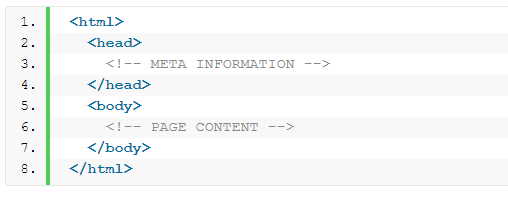
The three block level tags every HTML document needs to contain are:
The  html  tag is the highest level element that encloses every HTML page.
The  head  tag holds meta information such as the page’s title and charset.
Finally, the  body tag encloses all the content that appears on the page.

htmlcode.PNG

What is CSS?

CSS stands for Cascading Style Sheets with an emphasis placed on “Style.” While HTML is used to structure a web document (defining things like headlines and paragraphs, and allowing you to embed images, video, and other media), CSS comes through and specifies your document’s style—page layouts, colors, and fonts are all determined with CSS.
External stylesheets are stored in CSS files

css1.PNG

Example:

css2.jpg

Whats is Visual Studio Code (VSCode)?

vscode

Visual Studio Code is a source-code editor developed by Microsoft for Windows, Linux and macOS. It includes support for debugging, embedded Git control and GitHub, syntax highlighting, intelligent code completion, snippets, and code refactoring. It is highly customizable, allowing users to change the theme, keyboard shortcuts, preferences, and install extensions that add additional functionality. The source code is free and open source and released under the permissive MIT License. The compiled binaries are freeware and free for private or commercial use.
Visual Studio Code is based on Electron, a framework which is used to deploy Node.js applications for the desktop running on the Blink layout engine.

VSCode Home Page link

More topics covered:

  • Loading html pages from local hard drive
  • Embed CSS styles into HTML page: inline, style tag, file
  • What is Markup language?
  • VSCode loading from CMD using “code”
  • VSCode – “!” shortcut
  • HTML semantics
  • CSS selectors
  • HTML Tags: b, u, i, p, div, a, hr, h1..h6, img, ul, ol, li, br, btn
  • What is Bootstrap?
  • Developer tools – clicking F12 in Chrome
  • w3schools

Links:

06 OCT 2019

c#basics asp-net-mvc send-grid session

mvc2

What is the MVC pattern?

The Model-View-Controller (MVC) architectural pattern separates an application into three main groups of components: Models, Views, and Controllers. This pattern helps to achieve separation of concerns. Using this pattern, user requests are routed to a Controller which is responsible for working with the Model to perform user actions and/or retrieve results of queries. The Controller chooses the View to display to the user, and provides it with any Model data it requires … full article

What is Session?

Session – Is to keep track of each user’s request. So each time the web page is posted back asp.net runtime knows from which user the request is coming from. Now since HTTP is a stateless protocol, meaning each request from the same user is like a new request to it. So, to maintain a session Asp.Net has Session variables.

Session Variables- The session variables are variables maintained on server side by asp.net runtime. Each user is identified by a a unique number called SessioID. This session is stored in a cookie (if browser supports cookie) on client side after the first user request. when the client posts back a page , this cookie is available in the request header. So now server knows that this user request is coming from which user. Besides this you can also store user specific information in session variables, which will be availale on server side.

Sending Email with SendGrid

sendgrid.PNGprovides a cloud-based email delivery service that assists businesses with email delivery. The service manages various types of email including shipping notifications, friend requests, sign-up confirmations, and email newsletters. It also handles internet service provider (ISP) monitoring, domain keys, sender policy framework (SPF), and feedback loops.Additionally, the company provides link tracking, open rate reporting. It also allows companies to track email opens, unsubscribes, bounces, and spam reportsfull article

Click here for SendGrid home page

Sending email with local SMTP

for example download: tucows free (10 emails per day)
code demo: download here

Sending email with gmail SMTP

Update security level in gmail (single-factor):
gmail12

gmail34

console app code demo: download here

verify email project: download here

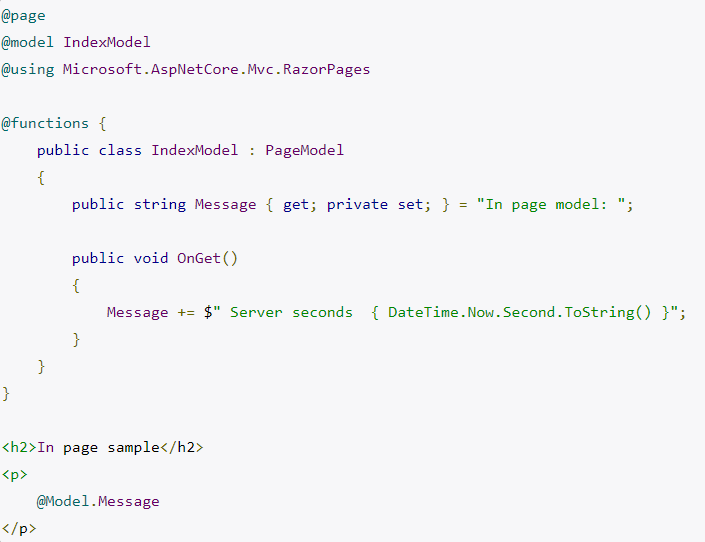
What are ASP.NET Razor Pages?

Razor is an ASP.NET programming syntax used to create dynamic web pages with the C# (or VB.NET) programming languages.
The Razor syntax is a template markup syntax, based on the C# programming language, that enables the programmer to use an HTML construction workflow. Instead of using the ASP.NET Web Forms (.aspx) markup syntax with <%= %> symbols to indicate code blocks, Razor syntax starts code blocks with an @ character and does not require explicit closing of the code-block.
The idea behind Razor is to provide an optimized syntax for HTML generation using a code-focused templating approach, with minimal transition between HTML and code. The design reduces the number of characters and keystrokes, and enables a more fluid coding workflow by not requiring explicitly denoted server blocks within the HTML code.

Other advantages that have been noted: (1) Supports IntelliSense – statement completion support (2) Supports “layouts” – an alternative to the “master page” concept in classic Web Forms (.aspx) (3)  Unit testable

Razor was in development in June 2010 and was released for Microsoft Visual Studio 2010 in January 2011. Razor is a simple-syntax view engine and was released as part of MVC 3 and the WebMatrix tool set. Razor became a component of AspNetWebStack and then became a part of ASP.NET Core … full article

Example:

razorecode

More topics covered:

  • Creating MVC controller
  • Creating Razor page
  • Adding dynamic data to the page
  • Index is default
  • return View (” Page Name “)
  • return Content (“ HTML …“);
  • return Redirect (” URL “);
  • return new FilePathResult (” Path-HTML-File “);
  • Getting query string from url
  • HttpContext.Application vs Session
  • Storing data in Session
  • Storing data in Application
  • HTML page
  • MCV default web page – Home
  • MVC layout template

Links:


02 OCT 2019

c#basics json-web-token dotnet-core

jwt

  • What is JSON Web Token (JWT)?

    JSON Web Token is an open standard (RFC 7519) that defines a compact and self-contained way for securely transmitting information between parties as a JSON object. This information can be verified and trusted because it is digitally signed. JWTs can be signed using a secret (with the HMAC algorithm [Hash based Message Authentication Code]) or a public/private key pair using RSA or ECDSA. Signed tokens can verify the integrity of the claims contained within it, while encrypted tokens hide those claims from other parties. When tokens are signed using public/private key pairs, the signature also certifies that only the party holding the private key is the one that signed it.

    When should you use JSON Web Tokens?

    Authorization: This is the most common scenario for using JWT. Once the user is logged in, each subsequent request will include the JWT, allowing the user to access routes, services, and resources that are permitted with that token. Single Sign On is a feature that widely uses JWT nowadays, because of its small overhead and its ability to be easily used across different domains. Information Exchange: JSON Web Tokens are a good way of securely transmitting information between parties. Because JWTs can be signed—for example, using public/private key pairs—you can be sure the senders are who they say they are. Additionally, as the signature is calculated using the header and the payload, you can also verify that the content hasn’t been tampered with … full article

  • What is a Public and Private Key Pair?

    Public and Private key pair helps to encrypt information that ensures data is protected during transmission. Private Key and public key are a part of encryption that encodes the information. Both keys work in two encryption systems called symmetric and asymmetric. Symmetric encryption (private-key encryption or secret-key encryption) utilize the same key for encryption and decryption. Asymmetric encryption utilizes a pair of keys like public and private key for better security where a message sender encrypts the message with the public key and the receiver decrypts it with his/her private key … full article

  • What are claims?

    Claim is piece of information that describes given identity on some aspect. Take claim as name-value pair. Claims are held in authentication token that may have also signature so you can be sure that token is not tampered on its way from remote machine to your system … full article

  • HMAC algorithm:

    MAC is a great resistant towards cryptanalysis attacks as it uses the Hashing concept twice. HMAC consists of twin benefits of Hashing and MAC, and thus is more secure than any other authentication codes … full article

    hmac

  • RSA:

    A public-key encryption technology developed by RSA Data Security, Inc. The acronym stands for Rivest, Shamir, and Adelman, the inventors of the technique. The RSA algorithm is based on the fact that there is no efficient way to factor very large numbers. Deducing an RSA key, therefore, requires an extraordinary amount of computer processing power and time. The RSA algorithm has become the de facto standard for industrial-strength encryption, especially for data sent over the Internet. It is built into many software products, including Netscape Navigator and Microsoft Internet Explorer. The technology is so powerful that the U.S. government has restricted exporting it to foreign countries.

  • ECDSA:

    ECDSA, also known as the Elliptic Curve Digital Signature Algorithm, is a version of the widely-used DSA algorithm which can achieve similar levels of security using a smaller key size. It does this by using elliptic curve cryptography, which is a public key cryptography technique developed in the mid-2000s. Rather than basing its security on a large integer that is the product of multiple large prime factors, it uses an ECDLP (elliptic curve discrete logarithmic problem).

More topics covered:

  • Payload
  • .NET Core 2.0
  • .NET Core 2.1
  • ASP .NET Core WebApi
  • Using Authentication Role for flight project
  • Base 64 string in jwt.io

Links:

25 SEP 2019

c#basics token-based-authentication IHttpActionResult

cred.PNG

The Token-Based Authentication works as Follows:

  1. A user enters the name and password into the client (client means the browser or mobile devices etc).
  2. The client then sends these credentials (i.e. username and password) to the Authorization Server.
  3. Then the Authorization Server authenticates the client credentials (i.e. username and password) and then it generates and returns an access token. This Access Token contains enough information to identify a user and also contains the token expiry time
  4. The client application then includes the Access Token in the Authorization header of the HTTP request to access the restricted resources from the Resource Server until the token is expired… full article

Single Sign On (SSO): characteristic of an authentication mechanism that relates to the user’s identity being used to provide access across multiple Service Providers.
Federation: common standards and protocols to manage and map user identities between Identity Providers across organizations (and security domains) via trust relationships (usually established via digital signatures, encryption, and PKI)… full article

The IHttpActionResult interface was introduced in Web API 2. Essentially, it defines an HttpResponseMessage factory. Some advantages of using the IHttpActionResult interface: (1) Simplifies unit testing your controllers (2) Moves common logic for creating HTTP responses into separate classes (3) Makes the intent of the controller action clearer, by hiding the low-level details of constructing the response. IHttpActionResult contains a single method, ExecuteAsync, which asynchronously creates an HttpResponseMessage instance… full article

ResponseType attribute is helpful for autogenerating documentation in tools like Swagger / Swashbuckle

CreatedAtRoute method is intended to return a URI to the newly created resource when you invoke a POST method to store some new object. So if you POST an order item for instance, you might return a route like ‘api/order/11’ (11 being the id of the new order)

ModelState.IsValid will basically tell you if there is any issues with your data posted to the server, based on the data annotations added to the properties of your model. If, for instance, you have a [Required(ErrorMessage = “Please fill”)], and that property is empty when you post your form to the server, ModelState will be invalid. The ModelBinder also checks some basic stuff for you. If, for instance, you have a BirthDate datepicker, and the property that this picker is binding to, is not a nullable DateTime type, your ModelState will also be invalid if you have left the date empty.

Final project Part III:

api2.png

More topics covered:

  • [ Authorize ]
  • WebApi users Table
  • Password requirements modification

Links:

Design a site like this with WordPress.com
Get started