06 OCT 2019

c#basics asp-net-mvc send-grid session

mvc2

What is the MVC pattern?

The Model-View-Controller (MVC) architectural pattern separates an application into three main groups of components: Models, Views, and Controllers. This pattern helps to achieve separation of concerns. Using this pattern, user requests are routed to a Controller which is responsible for working with the Model to perform user actions and/or retrieve results of queries. The Controller chooses the View to display to the user, and provides it with any Model data it requires … full article

What is Session?

Session – Is to keep track of each user’s request. So each time the web page is posted back asp.net runtime knows from which user the request is coming from. Now since HTTP is a stateless protocol, meaning each request from the same user is like a new request to it. So, to maintain a session Asp.Net has Session variables.

Session Variables- The session variables are variables maintained on server side by asp.net runtime. Each user is identified by a a unique number called SessioID. This session is stored in a cookie (if browser supports cookie) on client side after the first user request. when the client posts back a page , this cookie is available in the request header. So now server knows that this user request is coming from which user. Besides this you can also store user specific information in session variables, which will be availale on server side.

Sending Email with SendGrid

sendgrid.PNGprovides a cloud-based email delivery service that assists businesses with email delivery. The service manages various types of email including shipping notifications, friend requests, sign-up confirmations, and email newsletters. It also handles internet service provider (ISP) monitoring, domain keys, sender policy framework (SPF), and feedback loops.Additionally, the company provides link tracking, open rate reporting. It also allows companies to track email opens, unsubscribes, bounces, and spam reportsfull article

Click here for SendGrid home page

Sending email with local SMTP

for example download: tucows free (10 emails per day)
code demo: download here

Sending email with gmail SMTP

Update security level in gmail (single-factor):
gmail12

gmail34

console app code demo: download here

verify email project: download here

What are ASP.NET Razor Pages?

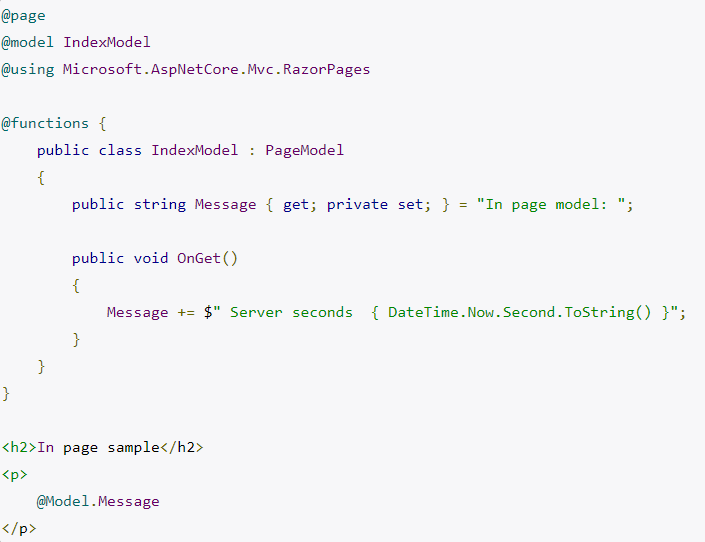
Razor is an ASP.NET programming syntax used to create dynamic web pages with the C# (or VB.NET) programming languages.
The Razor syntax is a template markup syntax, based on the C# programming language, that enables the programmer to use an HTML construction workflow. Instead of using the ASP.NET Web Forms (.aspx) markup syntax with <%= %> symbols to indicate code blocks, Razor syntax starts code blocks with an @ character and does not require explicit closing of the code-block.
The idea behind Razor is to provide an optimized syntax for HTML generation using a code-focused templating approach, with minimal transition between HTML and code. The design reduces the number of characters and keystrokes, and enables a more fluid coding workflow by not requiring explicitly denoted server blocks within the HTML code.

Other advantages that have been noted: (1) Supports IntelliSense – statement completion support (2) Supports “layouts” – an alternative to the “master page” concept in classic Web Forms (.aspx) (3)  Unit testable

Razor was in development in June 2010 and was released for Microsoft Visual Studio 2010 in January 2011. Razor is a simple-syntax view engine and was released as part of MVC 3 and the WebMatrix tool set. Razor became a component of AspNetWebStack and then became a part of ASP.NET Core … full article

Example:
razorecode

More topics covered:

  • Creating MVC controller
  • Creating Razor page
  • Adding dynamic data to the page
  • Index is default
  • return View (” Page Name “)
  • return Content (“ HTML …“);
  • return Redirect (” URL “);
  • return new FilePathResult (” Path-HTML-File “);
  • Getting query string from url
  • HttpContext.Application vs Session
  • Storing data in Session
  • Storing data in Application
  • HTML page
  • MCV default web page – Home
  • MVC layout template

Links:


02 OCT 2019

c#basics json-web-token dotnet-core

jwt

  • What is JSON Web Token (JWT)?

    JSON Web Token is an open standard (RFC 7519) that defines a compact and self-contained way for securely transmitting information between parties as a JSON object. This information can be verified and trusted because it is digitally signed. JWTs can be signed using a secret (with the HMAC algorithm [Hash based Message Authentication Code]) or a public/private key pair using RSA or ECDSA. Signed tokens can verify the integrity of the claims contained within it, while encrypted tokens hide those claims from other parties. When tokens are signed using public/private key pairs, the signature also certifies that only the party holding the private key is the one that signed it.

    When should you use JSON Web Tokens?

    Authorization: This is the most common scenario for using JWT. Once the user is logged in, each subsequent request will include the JWT, allowing the user to access routes, services, and resources that are permitted with that token. Single Sign On is a feature that widely uses JWT nowadays, because of its small overhead and its ability to be easily used across different domains. Information Exchange: JSON Web Tokens are a good way of securely transmitting information between parties. Because JWTs can be signed—for example, using public/private key pairs—you can be sure the senders are who they say they are. Additionally, as the signature is calculated using the header and the payload, you can also verify that the content hasn’t been tampered with … full article

  • What is a Public and Private Key Pair?

    Public and Private key pair helps to encrypt information that ensures data is protected during transmission. Private Key and public key are a part of encryption that encodes the information. Both keys work in two encryption systems called symmetric and asymmetric. Symmetric encryption (private-key encryption or secret-key encryption) utilize the same key for encryption and decryption. Asymmetric encryption utilizes a pair of keys like public and private key for better security where a message sender encrypts the message with the public key and the receiver decrypts it with his/her private key … full article

  • What are claims?

    Claim is piece of information that describes given identity on some aspect. Take claim as name-value pair. Claims are held in authentication token that may have also signature so you can be sure that token is not tampered on its way from remote machine to your system … full article

  • HMAC algorithm:

    MAC is a great resistant towards cryptanalysis attacks as it uses the Hashing concept twice. HMAC consists of twin benefits of Hashing and MAC, and thus is more secure than any other authentication codes … full article

    hmac

  • RSA:

    A public-key encryption technology developed by RSA Data Security, Inc. The acronym stands for Rivest, Shamir, and Adelman, the inventors of the technique. The RSA algorithm is based on the fact that there is no efficient way to factor very large numbers. Deducing an RSA key, therefore, requires an extraordinary amount of computer processing power and time. The RSA algorithm has become the de facto standard for industrial-strength encryption, especially for data sent over the Internet. It is built into many software products, including Netscape Navigator and Microsoft Internet Explorer. The technology is so powerful that the U.S. government has restricted exporting it to foreign countries.

  • ECDSA:

    ECDSA, also known as the Elliptic Curve Digital Signature Algorithm, is a version of the widely-used DSA algorithm which can achieve similar levels of security using a smaller key size. It does this by using elliptic curve cryptography, which is a public key cryptography technique developed in the mid-2000s. Rather than basing its security on a large integer that is the product of multiple large prime factors, it uses an ECDLP (elliptic curve discrete logarithmic problem).

More topics covered:

  • Payload
  • .NET Core 2.0
  • .NET Core 2.1
  • ASP .NET Core WebApi
  • Using Authentication Role for flight project
  • Base 64 string in jwt.io

Links:

25 SEP 2019

c#basics token-based-authentication IHttpActionResult

cred.PNG

The Token-Based Authentication works as Follows:

  1. A user enters the name and password into the client (client means the browser or mobile devices etc).
  2. The client then sends these credentials (i.e. username and password) to the Authorization Server.
  3. Then the Authorization Server authenticates the client credentials (i.e. username and password) and then it generates and returns an access token. This Access Token contains enough information to identify a user and also contains the token expiry time
  4. The client application then includes the Access Token in the Authorization header of the HTTP request to access the restricted resources from the Resource Server until the token is expired… full article

Single Sign On (SSO): characteristic of an authentication mechanism that relates to the user’s identity being used to provide access across multiple Service Providers.
Federation: common standards and protocols to manage and map user identities between Identity Providers across organizations (and security domains) via trust relationships (usually established via digital signatures, encryption, and PKI)… full article

The IHttpActionResult interface was introduced in Web API 2. Essentially, it defines an HttpResponseMessage factory. Some advantages of using the IHttpActionResult interface: (1) Simplifies unit testing your controllers (2) Moves common logic for creating HTTP responses into separate classes (3) Makes the intent of the controller action clearer, by hiding the low-level details of constructing the response. IHttpActionResult contains a single method, ExecuteAsync, which asynchronously creates an HttpResponseMessage instance… full article

ResponseType attribute is helpful for autogenerating documentation in tools like Swagger / Swashbuckle

CreatedAtRoute method is intended to return a URI to the newly created resource when you invoke a POST method to store some new object. So if you POST an order item for instance, you might return a route like ‘api/order/11’ (11 being the id of the new order)

ModelState.IsValid will basically tell you if there is any issues with your data posted to the server, based on the data annotations added to the properties of your model. If, for instance, you have a [Required(ErrorMessage = “Please fill”)], and that property is empty when you post your form to the server, ModelState will be invalid. The ModelBinder also checks some basic stuff for you. If, for instance, you have a BirthDate datepicker, and the property that this picker is binding to, is not a nullable DateTime type, your ModelState will also be invalid if you have left the date empty.

Final project Part III:

api2.png

More topics covered:

  • [ Authorize ]
  • WebApi users Table
  • Password requirements modification

Links:

22 SEP 2019

c#basics authentication authorization basic-authentication

auth2

Authentication is about validating your credentials such as Username/User ID and password to verify your identity. The system then checks whether you are what you say you are using your credentials. Whether in public or private networks, the system authenticates the user identity through login passwords. Usually authentication is done by a username and password

Authorization occurs after your identity is successfully authenticated by the system, which therefore gives you full access to resources such as information, files, databases, funds, etc. However authorization verifies your rights to grant you access to resources only after determining your ability to access the system and up to what extent. In other words, authorization is the process to determine whether the authenticated user has access to the particular resources. A good example of this is, once verifying and confirming employee ID and passwords through authentication, the next step would be determining which employee has access to which floor and that is done through authorization

Basic authentication is a method for an HTTP user agent (e.g. a web browser, postman) to provide a user name and password when making a request. In basic HTTP authentication, a request contains a header field in the form of Authorization: Basic <credentials>, where credentials is the base64 encoding of id and password joined by a single colon :

Base64 is generally used to transfer content-based messages over the Internet. It works by dividing every three bits of binary data into six bit units. The newly created data is represented in a 64-radix numeral system and as seven-bit ASCII text. Because each bit is divided into two bits, the converted data is 33 percent, or one-third, larger than the original data. Like binary data, Base64 encoded resultant data is not human readable

A principal (in computer security) is an entity that can be authenticated by a computer system or network. Principals can be individual people, computers, services, computational entities such as processes and threads, etc.

ThreadStatic: A static variable marked with the ThreadStatic attribute is not shared between threads, therefore each thread gets it’s own instance of the static variable.

More topics covered:

  • Postman – sending username and password
  • Session
  • Context
  • Cookie
  • Web Api BasicAuthenticaion implementaiton
  • AuthorizationFilterAttribute
  • Thread.CurrentPrincipal
  • RequestContext.Principal
  • Request.Properties – storage
  • Passing principle to web api controller

Links:

15 SEP 2019

c#basics web-services [route] query-parameters http-response-message

route.png

[Route (..path..) ]
Routing is how Web API matches a URI to an action. As the name implies, attribute routing uses attributes to define routes. Attribute routing gives you more control over the URIs in your web API. For example, you can easily create URIs that describe hierarchies of resources.

Query parameters are a defined set of parameters attached to the end of a url. They are extensions of the URL that are used to help define specific content or actions based on the data being passed. To append query params to the end of a URL, a ‘?’ Is added followed immediately by a query parameter. To add multiple parameters, an ‘&’ is added in between each. These can be created by any variation of object types or lengths such as String, Arrays and Numbers

HTTPResponseMessage represents a HTTP response message including the status code and data. this gives us control over the returned status code and the choice between result data (JSON) and between a text message (which could contain an exception string, etc)

More topics covered:

  • Query parameters default values
  • Multiple path parameters
  • HTTP status code enums

Links:

11 SEP 2019

c#basics web-services

webapi

What Are HTTP Methods?
Whenever a client submits a request to a server, part of that request is an HTTP method, which is what the client would like the server to do with the specified resource. HTTP methods represent those requested actions. For example, some commonly-used HTTP methods will retrieve data from a server, submit data to a server for processing, delete an item from the server’s data store, etc.

Selecting The Appropriate Method
A large portion of application functionality can be summed up in the acronym CRUD, which stands for Create, Read, Update, Delete. There are four HTTP methods that correspond to these actions, one for each, like so:
C – Create – POST
R – Read – GET
U – Update – PUT
D – Delete – DELETE

read more … full article

Swagger allows you to describe the structure of your APIs so that machines can read them. The ability of APIs to describe their own structure is the root of all awesomeness in Swagger. Why is it so great? Well, by reading your API’s structure, we can automatically build beautiful and interactive API documentation. We can also automatically generate client libraries for your API in many languages and explore other possibilities like automated testing. Swagger does this by asking your API to return a YAML or JSON that contains a detailed description of your entire API.

swagger

Request/ Response – Header + Body
Each HTTP request and HTTP response consist of a Header and a Body. in the header we declare meta data such as the operation type (GET POST PUT or DELETE), content type (JSON or XML), etc. in the body we carry the payload, for example: in HTTP request we would place the JSON object we would like to add (for the POST operation) in the request body, or another example would be in the HTTP response from the server- the JSON object which returns from the GET operation would be placed in the response body

head_body

HTTP Status Codes
Each HTTP response coming from the server contains a status (in the response header). The status codes are divided into: informational, success, redirect, client-error, server-error:
1xx Informational
100 Continue
101 Switching Protocols
102 Processing (WebDAV)
2xx Success
200 OK
201 Created
202 Accepted
203 Non-Authoritative Information
204 No Content
205 Reset Content
206 Partial Content
207 Multi-Status (WebDAV)
208 Already Reported (WebDAV)
226 IM Used
3xx Redirection
300 Multiple Choices
301 Moved Permanently
302 Found
303 See Other
304 Not Modified
305 Use Proxy
306 (Unused)
307 Temporary Redirect
308 Permanent Redirect (experimental)
4xx Client Error
400 Bad Request
401 Unauthorized
402 Payment Required
403 Forbidden
404 Not Found
405 Method Not Allowed
406 Not Acceptable
407 Proxy Authentication Required
408 Request Timeout
409 Conflict
410 Gone
411 Length Required
412 Precondition Failed
413 Request Entity Too Large
414 Request-URI Too Long
415 Unsupported Media Type
416 Requested Range Not Satisfiable
417 Expectation Failed
418 I’m a teapot (RFC 2324)
420 Enhance Your Calm (Twitter)
422 Unprocessable Entity (WebDAV)
423 Locked (WebDAV)
424 Failed Dependency (WebDAV)
425 Reserved for WebDAV
426 Upgrade Required
428 Precondition Required
429 Too Many Requests
431 Request Header Fields Too Large
444 No Response (Nginx)
449 Retry With (Microsoft)
450 Blocked by Windows Parental Controls (Microsoft)
5xx Server Error
500 Internal Server Error
501 Not Implemented
502 Bad Gateway
503 Service Unavailable
504 Gateway Timeout
505 HTTP Version Not Supported
506 Variant Also Negotiates (Experimental)
507 Insufficient Storage (WebDAV)
508 Loop Detected (WebDAV)
509 Bandwidth Limit Exceeded (Apache)
510 Not Extended
511 Network Authentication Required

More topics covered:

  • Send POST operation from console app
  • Placing JSON object in postman app
  • Method not allowed – error
  • uploading Web API to azure

Links:

08 SEP 2019

c#basics web-services asp.net-web-api postman rest

rest.PNG

REST- Representational state transfer (REST) is a software architectural style that defines a set of constraints to be used for creating Web services. Web services that conform to the REST architectural style, called RESTful Web services (RWS), provide interoperability between computer systems on the Internet. RESTful Web services allow the requesting systems to access and manipulate textual representations of Web resources by using a uniform and predefined set of stateless operations.
In a RESTful Web service, requests made to a resource’s URI will elicit a response with a payload formatted usually in JSON. The response can confirm that some alteration has been made to the stored resource, and the response can provide hypertext links to other related resources or collections of resources. When HTTP is used, as is most common, the operations (HTTP methods) available are GET, HEAD, POST, PUT, PATCH, DELETE, CONNECT, OPTIONS and TRACE
By using a stateless protocol and standard operations, RESTful systems aim for fast performance, reliability, and the ability to grow by reusing components that can be managed and updated without affecting the system as a whole, even while it is running.

Postman is one of the most popular tools used in API testing. it can simulate a GET POST PUT DELETE request in a single button click

JSONPlaceholder is a free online REST API that you can use whenever you need some fake data. It’s great for tutorials, testing new libraries, sharing code examples

More topics covered:

  • Git command line
  • Configure Web API to return JSON
  • Creating Web API Model
  • Using static list as a resource
  • JSON place holder

Links:

04 SEP 2019

c#basics web-services asp.net asp.net-web-api ajax iis

aspnet

ASP.NET is an open-source server-side web application framework designed for web development to produce dynamic web pages developed by Microsoft to allow programmers to build dynamic web sites, applications and services.systems.

Web Service is a web application which is basically a class consisting of methods that could be used by other applications. It also follows a code-behind architecture such as the ASP.NET web pages, although it does not have a user interface.

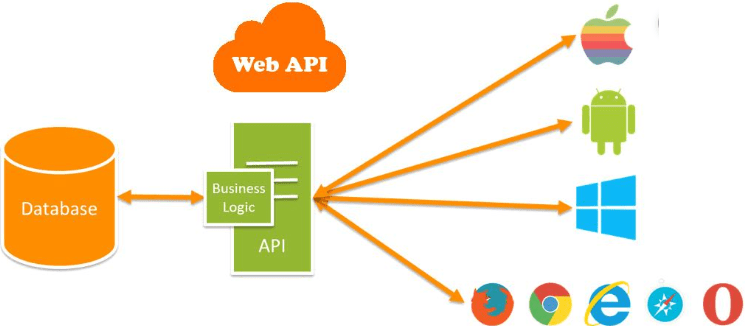
ASP.NET Web API is a framework for building HTTP services (and web services) that can be accessed from any client including browsers and mobile devices. It is an ideal platform for building RESTful applications on the .NET Framework.

Asynchronous JavaScript and XML (AJAX) is a set of web development techniques using many web technologies on the client side to create asynchronous web applications. With Ajax, web applications can send and retrieve data from a server asynchronously (in the background) without interfering with the display and behavior of the existing page. By decoupling the data interchange layer from the presentation layer, Ajax allows web pages and, by extension, web applications, to change content dynamically without the need to reload the entire page. In practice, modern implementations commonly utilize JSON instead of XML.

Internet Information Services (IIS ) web server accepts requests from remote client computers and returns the appropriate response. This basic functionality allows web servers to share and deliver information across local area networks, such as corporate intranets, and wide area networks, such as the internet. A web server can deliver information to users in several forms, such as static webpages coded in HTML; through file exchanges as downloads and uploads; and text documents, image files and more.
More topics covered:

  • App Services in Azure
  • Create a simple ASP .NET Web API
  • Creating simple ApiController 
  • /api/ [controller-name]
  • Single Page Application (SPA)
  • IIS Express
  • Tomcat, NodeJS

Links:

Design a site like this with WordPress.com
Get started