27 OCT 2019

HTML forms asp.net-forms

htmlform.png

What are HTML forms?

HTML Forms are one of the main points of interaction between a user and a web site or application. Forms allow users to enter data, generally sending that data to the web server (but a web page can also use form data client side).
An HTML Form is made of one or more widgets. Those widgets can be single or multi-line text fields, select boxes, buttons, check-boxes, or radio buttons. The single line text field widgets can even require data entered to be of a specific format or value. Form widgets should be paired with a properly implemented label that describes their purpose — labels help instruct both sighted and blind users on what to enter into a form input
… full article

How to send HTML form to the server?

We provide a name to each form control. The names are important both browser and server sides; they tell the browser which name to give each piece of data and, on the server side, they let the server handle each piece of data by name. The form data is sent to the server as name/value pairs.
To name the data in a form you need to use the name attribute on each form widget that will collect a specific piece of data.

Example:

forms1.PNG

How to receive the HTML form’s input in the server-side?

We will create an ASP.NET application with an MVC controller containing a function for the form submitting. in this function, we will use Request.Form to retrieve all of the data that the user has entered into our HTML form. each input data will be stored in a key-value format in the Request.Form dictionary: the key will be the html widget form input-name and the value will be the data entered by the user

More topics covered:

  • input + required
  • input type- text, number, password, email
  • radio-button, check-box
  • button type submit
  • form method: GET vs POST
  • storing the html form on the server
  • choosing result page depend on the form-input

Links:
23 OCT 2019

HTML CSS

htmlcss3

What is HTML?

HTML stands for Hypertext Markup Language. It allows the user to create and structure sections, paragraphs, headings, links, and blockquotes for web pages and applications.
HTML is the standard markup language for Web pages
HTML elements are the building blocks of HTML pages
HTML elements are represented by <> tags
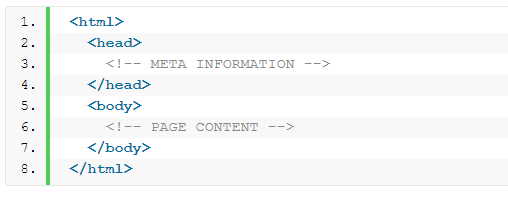
The three block level tags every HTML document needs to contain are:
The  html  tag is the highest level element that encloses every HTML page.
The  head  tag holds meta information such as the page’s title and charset.
Finally, the  body tag encloses all the content that appears on the page.

htmlcode.PNG

What is CSS?

CSS stands for Cascading Style Sheets with an emphasis placed on “Style.” While HTML is used to structure a web document (defining things like headlines and paragraphs, and allowing you to embed images, video, and other media), CSS comes through and specifies your document’s style—page layouts, colors, and fonts are all determined with CSS.
External stylesheets are stored in CSS files

css1.PNG

Example:

css2.jpg

Whats is Visual Studio Code (VSCode)?

vscode

Visual Studio Code is a source-code editor developed by Microsoft for Windows, Linux and macOS. It includes support for debugging, embedded Git control and GitHub, syntax highlighting, intelligent code completion, snippets, and code refactoring. It is highly customizable, allowing users to change the theme, keyboard shortcuts, preferences, and install extensions that add additional functionality. The source code is free and open source and released under the permissive MIT License. The compiled binaries are freeware and free for private or commercial use.
Visual Studio Code is based on Electron, a framework which is used to deploy Node.js applications for the desktop running on the Blink layout engine.

VSCode Home Page link

More topics covered:

  • Loading html pages from local hard drive
  • Embed CSS styles into HTML page: inline, style tag, file
  • What is Markup language?
  • VSCode loading from CMD using “code”
  • VSCode – “!” shortcut
  • HTML semantics
  • CSS selectors
  • HTML Tags: b, u, i, p, div, a, hr, h1..h6, img, ul, ol, li, br, btn
  • What is Bootstrap?
  • Developer tools – clicking F12 in Chrome
  • w3schools

Links:

Design a site like this with WordPress.com
Get started