
Final project web React – click here to download!

 react-assignment
react redux dist

React-redux makes it easier to pass these states from one component to another irrespective of their position in the component tree and hence prevents the complexity of the application.
When a react application holds various components in need of state from other components it becomes difficult to realize where the state should reside among these components to make it easier to maintain. React-redux provides a store which makes the state inside components easier to maintain. Along with stores, react-redux introduces actions and reducers which work simultaneously with stores to make the state more predictable. The working of the features in react-redux is explained below:

npm run build creates a build directory with a production build of your app. Inside the build/static directory will be your JavaScript and CSS files. Each filename inside of build/static will contain a unique hash of the file contents
another option will be to install react into visual studio, as explained here:
Using react inside visual studio
More topics covered:
Links:
react route hoc
React Router, and dynamic, client-side routing, allows us to build a single-page web application with navigation without the page refreshing as the user navigates. React Router uses component structure to call components, which display the appropriate information.
By preventing a page refresh, and using Router or Link, the flash of a white screen or blank page is prevented. This is one increasingly common way of having a more seamless user experience. React router also allows the user to utilize browser functionality like the back button and the refresh page while maintaining the correct view of the application.
react-router-dom
It contains the DOM bindings for React Router. In other words, the router components for websites
A higher-order component (HOC) is an advanced technique in React for reusing component logic. Concretely, a higher-order component is a function that takes a component and returns a new component. Whereas a component transforms props into UI, a higher-order component transforms a component into another component.
More topics covered:
Links:
react css lifecycle ajax
CSS Stylesheet:

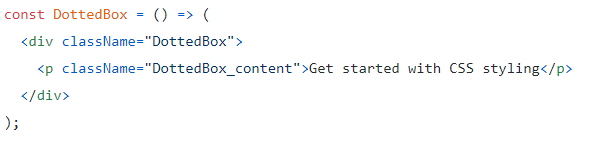
Inline styling:


Each component has several “lifecycle methods” that you can use to run code at particular times in the process. Methods prefixed with will are called right before something happens, and methods prefixed with did are called right after something happens
Examples:
componentDidMount() is invoked immediately after a component is mounted (inserted into the tree). Initialization that requires DOM nodes should go here. If you need to load data from a remote endpoint, this is a good place to instantiate the network request
componentDidUpdate() is invoked immediately after updating occurs. This method is not called for the initial render.
Use this as an opportunity to operate on the DOM when the component has been updated. This is also a good place to do network requests as long as you compare the current props to previous props (e.g. a network request may not be necessary if the props have not changed).
You can use any AJAX library you like with React. Some popular ones are Axios, jQuery AJAX, and the browser built-in window.fetch.
You should populate data with AJAX calls in the componentDidMount lifecycle method. This is so you can use setState to update your component when the data is retrieved.
More topics covered:
Links:
react list add remove
use Array’s built-in map function to create a new array that has the same number of elements, and where each element is the result of calling the function you provide

You might’ve noticed I used the item’s array index as the key prop in both examples above. This is actually not a great idea in all cases, and I’ll tell you why.
(The best choice for a key is an item’s unique ID, if it has one.)
React relies on the key to identify items in the list. Remember React uses a virtual DOM, and it only redraws the components that changed since the last render.
The first time a component like IdiomaticReactList is rendered, React will see that you want to render a bunch of items, and it will create DOM nodes for them.
The next time that component renders, React will say, “I already have some list items on screen – are these ones different?” It will avoid recreating DOM nodes if it can tell that the items are the same.
But here’s the important bit: React can’t tell with a simple equality check, because every time a JSX element is created, that’s a brand new object, unequal to the old one.
So that’s where the key prop comes in. React can look at the key and know that, yes, even though this <Item> is not strictly === to the old <Item>, it actually is the same because the keys are the same.
This leads to a couple rules for keys. They must be:
person.firstName would be a bad choice, for example (might not be unique).and
Math.random is a bad choice for a key (it’ll change every time… and it might not be unique (slim chance of that, though))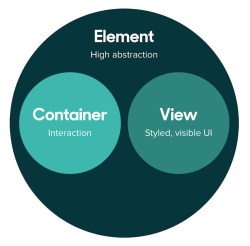
The main thing to keep in mind is that container components and presentational components go together when setting up a React app component hierarchy. React apps will almost always need some components that take responsibility for the way things work, and components for displaying actual data. Where presentational components don’t manage state, container components do. Where presentational components are usually children in the app component hierarchy, container components are usually the parents of presentational components.
More topics covered:
Links:
react redis redily
npx is a Node.js command-line tool which became available with npm@5.2.0. It enables npm to eXecute command-line Node.js tools without having them to be installed globally.
Command-line tools like mocha, gulp, react-native etc., are commonly installed globally using the -g flag with npm.
However, a globally installed package has two major problems:
When using npx, all you have to do is install the “global” command-line tool under your dependencies or devDependencies, it can then be executed within the context of the project directory using npx, without them actually being installed globally.
Create React apps with no build configuration.
Quick overview:
npx create-react-app my-app
cd my-app
npm start
Runs the app in development mode.
Open http://localhost:3000 to view it in the browser.
Nested Components are exactly what the name implies. They are children nested inside parent components. They simply help us create more complex UI structures. For example, an alert component probably has another sub-component nested within it to indicate the actual number of alerts. A message box has an inner input element and a send button.
Nested components simplify complex applications. In this coding challenge, let’s build a truck wheel manager application. I followed this modular approach to nest wheels inside axles, and nest axles within the truck frame (see image to the right.) Both wheels and axles could then be dynamically added or deleted from the UI, offering flexibility in defining different types of vehicles (trailer, semi, bus, etc.)
In React props is short for properties. They are single values or objects containing a set of values that are passed to React Components on creation using a naming convention similar to HTML-tag attributes.
The primary purpose of props in React is to provide following component functionality:
In computing, a cache is a hardware or software component that stores data so that future requests for that data can be served faster; the data stored in a cache might be the result of an earlier computation or a copy of data stored elsewhere. A cache hit occurs when the requested data can be found in a cache, while a cache miss occurs when it cannot. Cache hits are served by reading data from the cache, which is faster than recomputing a result or reading from a slower data store; thus, the more requests that can be served from the cache, the faster the system performs.
To be cost-effective and to enable efficient use of data, caches must be relatively small. Nevertheless, caches have proven themselves in many areas of computing, because typical computer applications access data with a high degree of locality of reference. Such access patterns exhibit temporal locality, where data is requested that has been recently requested already, and spatial locality, where data is requested that is stored physically close to data that has already been requested.

Redis Cache is an open source (BSD licensed), in-memory data structure store, used as a database, cache and message broker. It supports data structures such as strings, hashes, lists, sets, sorted sets with range queries, bitmaps, hyperloglogs, geospatial indexes with radius queries and streams. Redis has built-in replication, Lua scripting, LRU eviction, transactions and different levels of on-disk persistence, and provides high availability via Redis Sentinel and automatic partitioning with Redis Cluster
redis.io for windows – download page

Redily is a modern Redis GUI Client built to improve developer productivity
More topics covered:
Links:
angular-assignment
react node-js-express
React (also known as React.js or ReactJS) is a JavaScript library for building user interfaces. It is maintained by Facebook and a community of individual developers and companies.React can be used as a base in the development of single-page or mobile applications, as it is optimal for fetching rapidly changing data that needs to be recorded. However, fetching data is only the beginning of what happens on a web page, which is why complex React applications usually require the use of additional libraries for state management, routing, and interaction with an API; Redux, React Router and axios are respective examples of such libraries.
Who is the most popular framework ? – link
script src crossorigin
The crossorigin attribute should only be used if we care about getting error information for the script being loaded. Since accessing this information requires a CORS check, the Access-Control-Allow-Origin header must be present on the resource for it to be loaded.

The exports keyword gives you the chance to “export” your objects and methods. Let’s do an example:

In the code below, we are exporting the area and circumference functions. We defined the PI constant, but this is only accessible within the module. Only the elements associated with exports are available outside the module.
So, we can consume it using require in another file like follows:Noticed that this time we prefix the module name with ./. That indicates that the module is a local file.

Express.js, or simply Express, is a web application framework for Node.js, It is designed for building web applications and APIs. It has been called the de facto standard server framework for Node.js. express provides a robust set of features for web and mobile applications.
More topics covered:
Links:
nodejs angularjs directives

Node.js is an open-source, cross-platform, JavaScript runtime environment that executes JavaScript code outside of a browser. Node.js lets developers use JavaScript to write command line tools and for server-side scripting—running scripts server-side to produce dynamic web page content before the page is sent to the user’s web browser. Consequently, Node.js represents a “JavaScript everywhere” paradigm, unifying web-application development around a single programming language, rather than different languages for server- and client-side scripts.
Node.js has an event-driven architecture capable of asynchronous I/O. These design choices aim to optimize throughput and scalability in web applications with many input/output operations, as well as for real-time Web applications (e.g., real-time communication programs and browser games).
Nodejs home page – click here!
Node Package Manager (NPM) – modules download page

Custom directives are used in AngularJS to extend the functionality of HTML. Custom directives are defined using “directive” function. A custom directive simply replaces the element for which it is activated. AngularJS application during bootstrap finds the matching elements and do one time activity using its compile() method of the custom directive then process the element using link() method of the custom directive based on the scope of the directive. AngularJS provides support to create custom directives for following type of elements.
More topics covered:
Links:
web-project
We discussed the three pages of the web project:
After the AJAX call result has been resolved, we will iterate over the response array and add each flight result into the display table
Server-side: in order to support the AJAX call we need to add a web API endpoint for the landing-flights, departure-flights and the flights search. we can add those methods into the Anonymous facade (+api-Controller) or create a new facade, i.e. LandDepartueFacade (+api-controller) which will expose the requested functionality. the facade will call an ADO method which will execute an SQL query into the data-base in order to fetch the data. the SQL query should include all of the search parameters (i.e. landing time, searching filters etc.) instead of fetching the entire data and filtering out the results using LINQ
Javascript Implementation recommendations:
Links:

 .NET Experts