22 SEP 2019

c#basics authentication authorization basic-authentication

auth2

Authentication is about validating your credentials such as Username/User ID and password to verify your identity. The system then checks whether you are what you say you are using your credentials. Whether in public or private networks, the system authenticates the user identity through login passwords. Usually authentication is done by a username and password

Authorization occurs after your identity is successfully authenticated by the system, which therefore gives you full access to resources such as information, files, databases, funds, etc. However authorization verifies your rights to grant you access to resources only after determining your ability to access the system and up to what extent. In other words, authorization is the process to determine whether the authenticated user has access to the particular resources. A good example of this is, once verifying and confirming employee ID and passwords through authentication, the next step would be determining which employee has access to which floor and that is done through authorization

Basic authentication is a method for an HTTP user agent (e.g. a web browser, postman) to provide a user name and password when making a request. In basic HTTP authentication, a request contains a header field in the form of Authorization: Basic <credentials>, where credentials is the base64 encoding of id and password joined by a single colon :

Base64 is generally used to transfer content-based messages over the Internet. It works by dividing every three bits of binary data into six bit units. The newly created data is represented in a 64-radix numeral system and as seven-bit ASCII text. Because each bit is divided into two bits, the converted data is 33 percent, or one-third, larger than the original data. Like binary data, Base64 encoded resultant data is not human readable

A principal (in computer security) is an entity that can be authenticated by a computer system or network. Principals can be individual people, computers, services, computational entities such as processes and threads, etc.

ThreadStatic: A static variable marked with the ThreadStatic attribute is not shared between threads, therefore each thread gets it’s own instance of the static variable.

More topics covered:

  • Postman – sending username and password
  • Session
  • Context
  • Cookie
  • Web Api BasicAuthenticaion implementaiton
  • AuthorizationFilterAttribute
  • Thread.CurrentPrincipal
  • RequestContext.Principal
  • Request.Properties – storage
  • Passing principle to web api controller

Links:

15 SEP 2019

c#basics web-services [route] query-parameters http-response-message

route.png

[Route (..path..) ]
Routing is how Web API matches a URI to an action. As the name implies, attribute routing uses attributes to define routes. Attribute routing gives you more control over the URIs in your web API. For example, you can easily create URIs that describe hierarchies of resources.

Query parameters are a defined set of parameters attached to the end of a url. They are extensions of the URL that are used to help define specific content or actions based on the data being passed. To append query params to the end of a URL, a ‘?’ Is added followed immediately by a query parameter. To add multiple parameters, an ‘&’ is added in between each. These can be created by any variation of object types or lengths such as String, Arrays and Numbers

HTTPResponseMessage represents a HTTP response message including the status code and data. this gives us control over the returned status code and the choice between result data (JSON) and between a text message (which could contain an exception string, etc)

More topics covered:

  • Query parameters default values
  • Multiple path parameters
  • HTTP status code enums

Links:

11 SEP 2019

c#basics web-services

webapi

What Are HTTP Methods?
Whenever a client submits a request to a server, part of that request is an HTTP method, which is what the client would like the server to do with the specified resource. HTTP methods represent those requested actions. For example, some commonly-used HTTP methods will retrieve data from a server, submit data to a server for processing, delete an item from the server’s data store, etc.

Selecting The Appropriate Method
A large portion of application functionality can be summed up in the acronym CRUD, which stands for Create, Read, Update, Delete. There are four HTTP methods that correspond to these actions, one for each, like so:
C – Create – POST
R – Read – GET
U – Update – PUT
D – Delete – DELETE

read more … full article

Swagger allows you to describe the structure of your APIs so that machines can read them. The ability of APIs to describe their own structure is the root of all awesomeness in Swagger. Why is it so great? Well, by reading your API’s structure, we can automatically build beautiful and interactive API documentation. We can also automatically generate client libraries for your API in many languages and explore other possibilities like automated testing. Swagger does this by asking your API to return a YAML or JSON that contains a detailed description of your entire API.

swagger

Request/ Response – Header + Body
Each HTTP request and HTTP response consist of a Header and a Body. in the header we declare meta data such as the operation type (GET POST PUT or DELETE), content type (JSON or XML), etc. in the body we carry the payload, for example: in HTTP request we would place the JSON object we would like to add (for the POST operation) in the request body, or another example would be in the HTTP response from the server- the JSON object which returns from the GET operation would be placed in the response body

head_body

HTTP Status Codes
Each HTTP response coming from the server contains a status (in the response header). The status codes are divided into: informational, success, redirect, client-error, server-error:
1xx Informational
100 Continue
101 Switching Protocols
102 Processing (WebDAV)
2xx Success
200 OK
201 Created
202 Accepted
203 Non-Authoritative Information
204 No Content
205 Reset Content
206 Partial Content
207 Multi-Status (WebDAV)
208 Already Reported (WebDAV)
226 IM Used
3xx Redirection
300 Multiple Choices
301 Moved Permanently
302 Found
303 See Other
304 Not Modified
305 Use Proxy
306 (Unused)
307 Temporary Redirect
308 Permanent Redirect (experimental)
4xx Client Error
400 Bad Request
401 Unauthorized
402 Payment Required
403 Forbidden
404 Not Found
405 Method Not Allowed
406 Not Acceptable
407 Proxy Authentication Required
408 Request Timeout
409 Conflict
410 Gone
411 Length Required
412 Precondition Failed
413 Request Entity Too Large
414 Request-URI Too Long
415 Unsupported Media Type
416 Requested Range Not Satisfiable
417 Expectation Failed
418 I’m a teapot (RFC 2324)
420 Enhance Your Calm (Twitter)
422 Unprocessable Entity (WebDAV)
423 Locked (WebDAV)
424 Failed Dependency (WebDAV)
425 Reserved for WebDAV
426 Upgrade Required
428 Precondition Required
429 Too Many Requests
431 Request Header Fields Too Large
444 No Response (Nginx)
449 Retry With (Microsoft)
450 Blocked by Windows Parental Controls (Microsoft)
5xx Server Error
500 Internal Server Error
501 Not Implemented
502 Bad Gateway
503 Service Unavailable
504 Gateway Timeout
505 HTTP Version Not Supported
506 Variant Also Negotiates (Experimental)
507 Insufficient Storage (WebDAV)
508 Loop Detected (WebDAV)
509 Bandwidth Limit Exceeded (Apache)
510 Not Extended
511 Network Authentication Required

More topics covered:

  • Send POST operation from console app
  • Placing JSON object in postman app
  • Method not allowed – error
  • uploading Web API to azure

Links:

08 SEP 2019

c#basics web-services asp.net-web-api postman rest

rest.PNG

REST- Representational state transfer (REST) is a software architectural style that defines a set of constraints to be used for creating Web services. Web services that conform to the REST architectural style, called RESTful Web services (RWS), provide interoperability between computer systems on the Internet. RESTful Web services allow the requesting systems to access and manipulate textual representations of Web resources by using a uniform and predefined set of stateless operations.
In a RESTful Web service, requests made to a resource’s URI will elicit a response with a payload formatted usually in JSON. The response can confirm that some alteration has been made to the stored resource, and the response can provide hypertext links to other related resources or collections of resources. When HTTP is used, as is most common, the operations (HTTP methods) available are GET, HEAD, POST, PUT, PATCH, DELETE, CONNECT, OPTIONS and TRACE
By using a stateless protocol and standard operations, RESTful systems aim for fast performance, reliability, and the ability to grow by reusing components that can be managed and updated without affecting the system as a whole, even while it is running.

Postman is one of the most popular tools used in API testing. it can simulate a GET POST PUT DELETE request in a single button click

JSONPlaceholder is a free online REST API that you can use whenever you need some fake data. It’s great for tutorials, testing new libraries, sharing code examples

More topics covered:

  • Git command line
  • Configure Web API to return JSON
  • Creating Web API Model
  • Using static list as a resource
  • JSON place holder

Links:

04 SEP 2019

c#basics web-services asp.net asp.net-web-api ajax iis

aspnet

ASP.NET is an open-source server-side web application framework designed for web development to produce dynamic web pages developed by Microsoft to allow programmers to build dynamic web sites, applications and services.systems.

Web Service is a web application which is basically a class consisting of methods that could be used by other applications. It also follows a code-behind architecture such as the ASP.NET web pages, although it does not have a user interface.

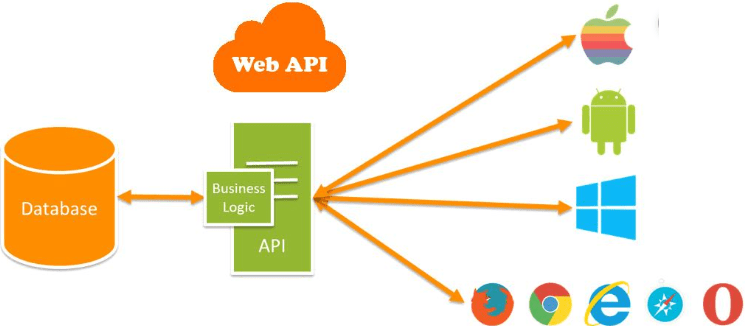
ASP.NET Web API is a framework for building HTTP services (and web services) that can be accessed from any client including browsers and mobile devices. It is an ideal platform for building RESTful applications on the .NET Framework.

Asynchronous JavaScript and XML (AJAX) is a set of web development techniques using many web technologies on the client side to create asynchronous web applications. With Ajax, web applications can send and retrieve data from a server asynchronously (in the background) without interfering with the display and behavior of the existing page. By decoupling the data interchange layer from the presentation layer, Ajax allows web pages and, by extension, web applications, to change content dynamically without the need to reload the entire page. In practice, modern implementations commonly utilize JSON instead of XML.

Internet Information Services (IIS ) web server accepts requests from remote client computers and returns the appropriate response. This basic functionality allows web servers to share and deliver information across local area networks, such as corporate intranets, and wide area networks, such as the internet. A web server can deliver information to users in several forms, such as static webpages coded in HTML; through file exchanges as downloads and uploads; and text documents, image files and more.
More topics covered:

  • App Services in Azure
  • Create a simple ASP .NET Web API
  • Creating simple ApiController 
  • /api/ [controller-name]
  • Single Page Application (SPA)
  • IIS Express
  • Tomcat, NodeJS

Links:

01 SEP 2019

c#basics Azure MSSQL-cloud HTML

msazure.png

Microsoft Azure is a cloud computing service created by Microsoft for building, testing, deploying, and managing applications and services through Microsoft-managed data centers. It provides software as a service (SaaS), platform as a service (PaaS) and infrastructure as a service (IaaS) and supports many different programming languages, tools and frameworks, including both Microsoft-specific and third-party software and systems.

HTML
HTML stands for Hyper Text Markup Language
HTML is the standard markup language for Web pages
HTML elements are the building blocks of HTML pages
HTML elements are represented by <> tags

More topics covered:

  • Azure free account
  • Azure Virtual machines
  • Azure resource group
  • Azure MSSQL Server
  • Upload  local MSSQL DB to Azure
  • Update connection string to the Azure url
  • Open MSSQL Azure firewall
  • Azure DTU cost of MSSQL
  • Basic web architecture
  • What is a domain?
  • Visual Studio Code
  • What is HTML page
  • User control – flip between controls
  • Custom dependency property – initial value
  • Validation error – trigger event

Links:

Design a site like this with WordPress.com
Get started